• The Reputation Changes Notice is posted in the Announcement Forum.

The New Year New Member Swap - Due March 7, 2024

Feedback (formerly iTrader) has been submitted for all participants.

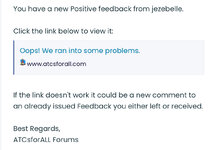
You have received a Convo with a link, it looks something like this…
8C64F761-1303-4B03-8F52-DEE919466789.jpeg
That “Oops!” remark needs to be fixed. There is nothing wrong with the link, just click on it.
Be sure to scroll down to check out any comments lefts by your host.

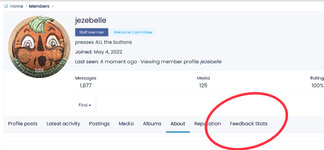
You can also access your Feedback via your profile page…
CC8FF6A9-8C5A-4DD5-8CF7-77F53635E4A1.jpeg
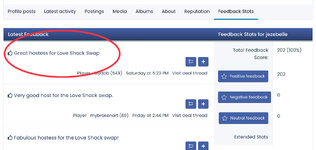
To see the additional comments, click on the short comment in the list view.DAE987ED-CEF1-40AF-917D-660D16D9C119.jpeg
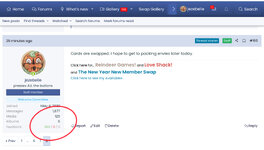
Or you can access your Feedback via your mini profile (What the heck are those things actually called?) to left of any post.
0E932E73-AD1F-4ED7-A795-BD7381C490B1.jpeg
To see the additional comments, click on the short comment in the list view.

When you receive your returns, please be sure to leave Feedback for your host.
(I’ll try to make a post about that a bit later.)
 
Last edited:
PSA

When you check out your Feedback comments, you may be inclined to reply. You can do so by clicking “Add Comment” at upper right of the Feedback entry. But I don’t recommend it. At this time, there is no automated Conversation sent to alert recipients of additional comments, so those comments may go unnoticed.

Some swappers have been responding to Feedback comments via Conversation. Specifically, they have replied to the Convo that notified them of new Feedback. I think this method rocks.
 
Last edited:
By the way, I did not use the Deal URL function on your Feedbacks. I am having some trouble with it. I’m not sure what the problem is (I previously used it very easily) and I haven’t had the time to sort it out.
 
Last edited:
Returns could begin to arrive at any time. When you receive your returns, I would appreciate it if you post in the thread to let us know.

Please make time to acknowledge the artists that created your returns, they took time to create them for you. There’s really no wrong way to do this. You can…
- use the thread to post thank yous to your swapmates
- utilize the Reputation/Comment system in the thread
- send a Profile Post (PP)
- send a Conversation
- walk, drive, ride, or fly to their location and give them a big hug
 
Last edited:
When (not before) you receive your returns, you should also leave Feedback for your Host.

What is Feedback?

Feedback is a rating system that gives any member a view into the trading and hosting history of any other member. The Feedback system also allows members to give literal feedback in the form of comments. (FYI - I really appreciate comments left in Feedback. Learning what you loved or hated about a swap helps me learn to be a better host.)

Read here to find out who gets Feedback, when they get it, and details about the ratings…

Here’s a recently updated How To…

* If you need/want more detailed instruction, I will give you my How To (as an iPad user) in the next post.

You can find other Feedback Related topics in the FAQ…
 
Last edited:
How to leave Feedback using an iPad
(detailed instructions)

First, access the Add Feedback page for the desired member.
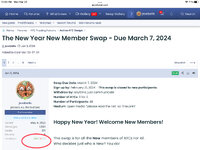
You can access the page from any post in the thread (1) or from their profile page (2).

1. From any post…
Check out the mini profile on the left.
Click on the numbers to the right of the word Feedback.

E1C3C2A5-D57F-4E1D-BDD6-D88364079672.jpeg

Then click the blue “Add Feedback” button on the right.

* You can also access the Add Feedback page directly from the (clickable) ”Add Feedback” line on the mini profile. Unfortunately, I believe there is a problem with the autofill of the Deal URL from this access point. You will need to delete the Deal URL (until the problem is fixed) if you use this access point.

2. From a profile page…
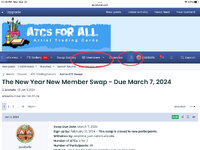
Go to the main navigation bar.

94CAD0D2-C21B-44B7-8747-A829A347EFFF.jpeg

Click “Members”.
If you don’t see Members, click that arrow until you do.
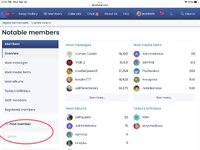
Scroll down until you see “Find member” on the left.

E37763E3-17A0-4754-9524-8C42FB17B14C.jpeg

Type a name, the name may autofill.
Click on the name or enter/return to go to the member’s profile page.
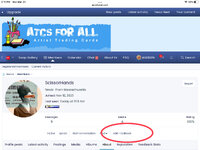
From the profile page click “Add Feedback”.

A9819043-6F3B-49A9-A451-5444C46C23D4.jpeg

Adding Feedback
The form will pop up.
Choose player, host, or trader. (In this swap, you are the player.)
Choose positive, negative or neutral.
Type into the box that says “Short Review” (thanks for hosting the dog swap or I received your 1:1 trade or whatever)
Type a nice “Comment” in the box if you want to show some appreciation (or complain, lol)
Click “Add Feedback”

You have completed the task.

Next you will receive a Convo that is full of errors. (Hopefully, that will soon be fixed.)
It will be addressed to the person you sent the iTrader to. It will say “Oops…”
Just ignore all of that, none of it matters, it actually means that you did it correctly!
You can delete the Convo.

Just ask if I didn’t explain something clearly enough.
 
Last edited:
Thanks so much for hosting this swap jezebelle. You always do such a great job as hostess. And thanks to these artists. I hope they will continue to stick around!
Haikoo - Awakening Moon
rayx2mac - Sunset
secretgardensketchbook - Winter Wonderland

I gave all these artists +1 rep. Since reps don't really count for credits, I wanted to treat everybody the same.
 
Last edited:
Back
Top Bottom